
Waka TV
Waka TV setup guide

How to install Waka TV on a Smart TV, Fire Stick or Android TV

Pick your device below for clear, numbered steps. Most people are watching within five minutes — and if you get stuck, we're on WhatsApp 24/7.

  • Takes about 5 minutes
  • The app is free
  • No rooting or jailbreak

Downloader code

3580576

For Fire TV Stick, Android TV and TV boxes.

Other download options

Installation

Choose your device

Fire TV Stick & Fire TV

Fire TV Stick, Stick 4K, Fire TV Cube · Downloader · 5–7 minutes

  1. 1From the Fire TV home screen, go to Find → Search, type Downloader and install the free Downloader app.
  2. 2Go to Settings → My Fire TV → Developer Options. If you don't see Developer Options, open Settings → My Fire TV → About and click your device name 7 times to unlock it.
  3. 3In Developer Options, choose Install Unknown Apps and switch Downloader to ON.
  4. 4Open Downloader, type 3580576 in the address box and press Go.
  5. 5When the download finishes, choose Install, then Open.
  6. 6Log in with the Waka TV details we sent you on WhatsApp — channels and movies load automatically.

Tip: once the app is installed you can delete the downloaded file in Downloader to free up space on the stick.
Android TV & Google TV Smart TVs

TCL, Sony, Philips, Hisense (Android models) & more · Play Store · 3–5 minutes

  1. 1Open the Google Play Store on your TV and search for Zest Player IBO — that's the name the Waka TV app is listed under.
  2. 2Select Install, then Open.
  3. 3If the app doesn't appear in your TV's Play Store, install Downloader from the Play Store instead and enter code 3580576 (allow Downloader to install unknown apps when asked).
  4. 4Log in with your Waka TV details and start watching.

Not sure if your TV runs Android? Look for the Google Play Store on the home screen, or check Settings → About for “Android TV” or “Google TV”.

Samsung, LG & other non-Android Smart TVs

Samsung (Tizen), LG (webOS), Hisense (VIDAA) · streaming stick · 10 minutes

  1. 1These TVs don't run Android apps, so the easiest route is a Fire TV Stick or Android TV box plugged into a free HDMI port.
  2. 2Switch the TV's input to that HDMI port and finish the stick's own setup (Wi-Fi and account).
  3. 3Install Waka TV on the stick using the Fire TV or Android TV steps above (Downloader code 3580576).
  4. 4Log in, and use the stick's remote to watch Waka TV on your Smart TV.

Not sure which option suits your TV? Send us the model number on WhatsApp and we'll tell you what to use.

Android TV boxes

Mi Box, X96 & other Android boxes · APK or Downloader · 5 minutes

  1. 1If the box has the Play Store, search for Zest Player IBO and install it.
  2. 2No Play Store? Install Downloader and enter 3580576, or open the box's browser and download the APK directly.
  3. 3When asked, allow the app you used to download it to install unknown apps.
  4. 4Install, open and log in with your Waka TV details.

Android phones & tablets

Samsung, Huawei, Xiaomi, Oppo & more · Play Store or APK · 3 minutes

  1. 1Tap “Get it on Google Play” on our homepage, or search for Zest Player IBO in the Play Store, and install.
  2. 2No Play Store (e.g. newer Huawei phones)? Use the Download APK button and allow your browser to install unknown apps when asked.
  3. 3Open the app and log in with your Waka TV details.

Watching on mobile data? Streaming uses about 3–8 GB an hour, so Wi-Fi is the better choice for long matches and movies.

iPhone, iPad or computer? Message us on WhatsApp and we'll tell you the best way to watch on your device.

Last step

Log in and start watching

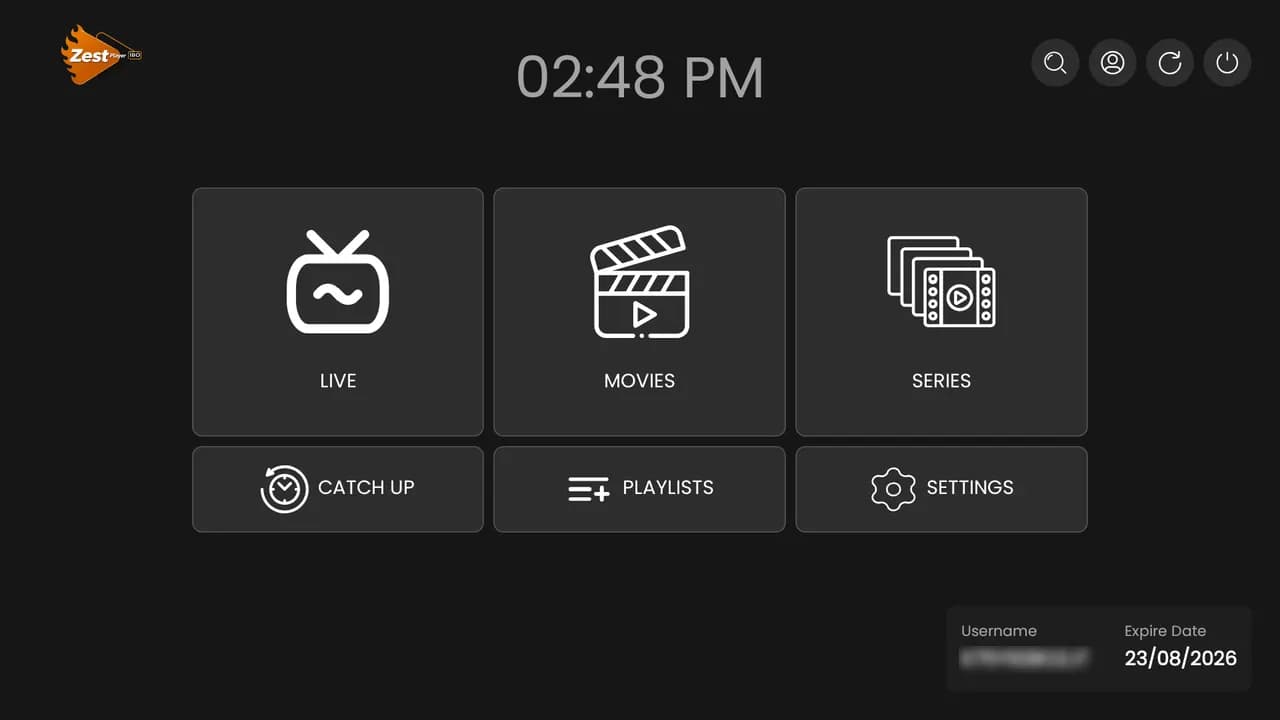
After your order is activated, we send your Waka TV login details on WhatsApp. Open the app, enter them exactly as sent, and your channels, movies and series load in under a minute. Your username and expiry date then show on the home screen.

  • • Logins are case-sensitive — copy and paste them if you can.
  • • The same login works on every device you install the app on.
  • • Login errors or forgotten details? See our Waka TV login help.
Waka TV app home screen after logging in, showing username and expiry date
Troubleshooting

Setup questions

The Waka TV app is listed on Google Play as Zest Player IBO. Search for that name, or use the Google Play link on our homepage. On devices without the Play Store, use Downloader code 3580576 or the direct APK.

Stuck on a step?

Our team will walk you through it on WhatsApp — or try Waka TV free for 24 hours before you buy.